\"SecureSafety zone detection events — the data that feeds into your EHS incident management system.\"
The first integration question is rarely the right one. Most IT teams reviewing a safety AI deployment begin with: "How does this connect to our EHS system?" A better first question is: "What does a successful integration look like from the perspective of the person who needs to act on the data?"
Consider the control room operator who receives a priority alert at 02:30 during a night shift. They do not need the alert to flow through the EHS incident management system before they can act. They need it on the control room screen now, on the supervisor's smartwatch now, and — depending on the severity — through the site PA system now. What they need from the EHS system is the ability to attach the AI's timestamped event record to the formal incident log after they have acted.
That sequence — act first, document formally second — shapes the integration architecture for safety AI in most industrial deployments. Getting it wrong produces a system where real-time alerts are delayed by middleware, or where the EHS team has rich historical data but the operations team has no useful real-time feed. Getting it right produces a system where every alert reaches the right person in the right format in time to matter, and where that event is automatically available to the safety management process that follows.
The Four Integration Layers
Safety AI connects to the existing site technology stack across four distinct layers. Each has a different function, a different technical profile, and a different stakeholder. Treating them as a single problem is the root cause of most integration complications.
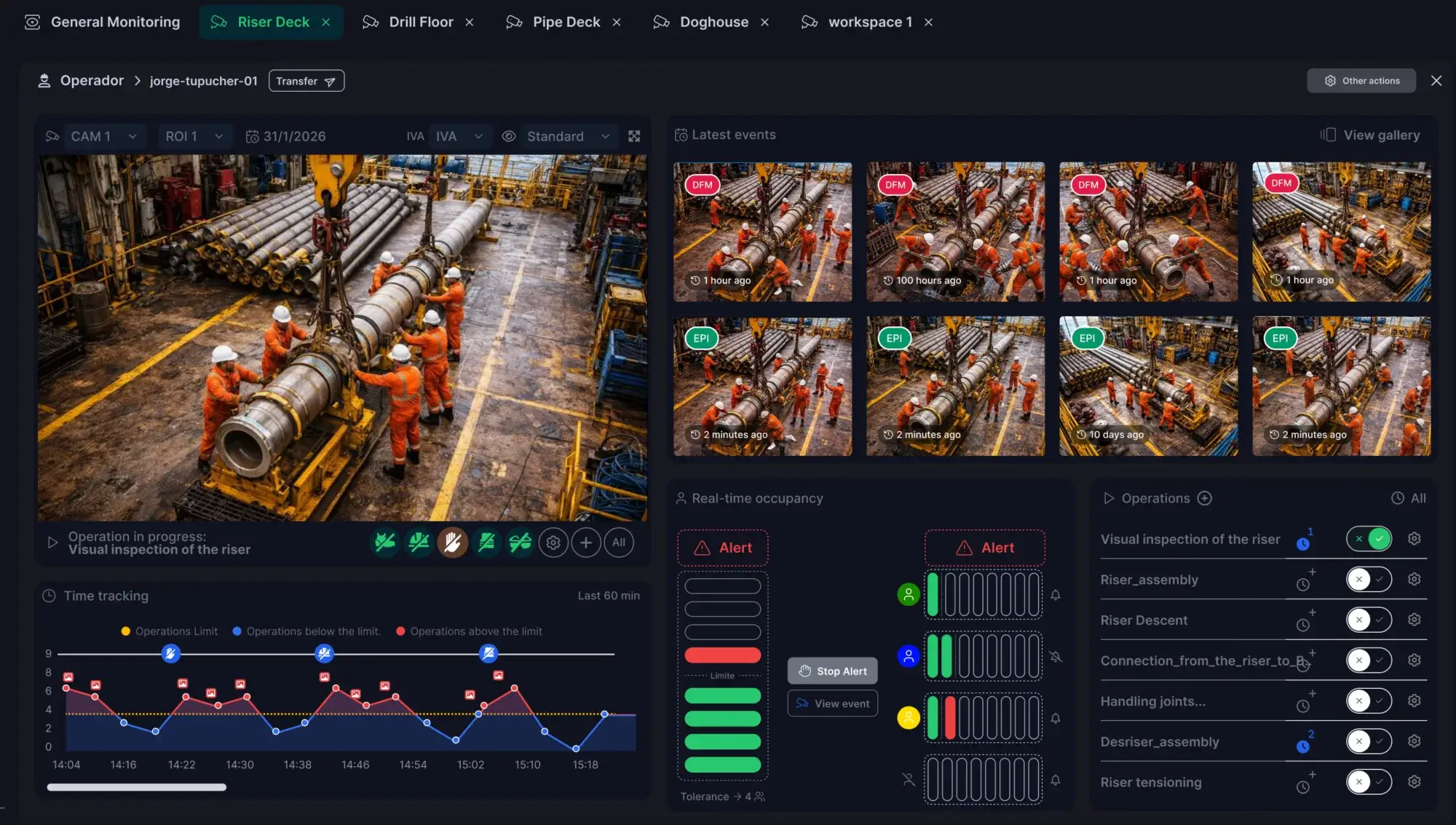 The SecureSafety event dashboard: each detected alert carries a timestamp, camera ID, confidence score, and clip — the data that feeds into your EHS system at the integration layer.
Layer 1: Camera and video management (VMS/CCTV). This is where the AI gets its data. It connects to your existing cameras and video management system to receive the video streams it analyses. The integration here is inbound — data flows from the camera network into the AI platform.
The SecureSafety event dashboard: each detected alert carries a timestamp, camera ID, confidence score, and clip — the data that feeds into your EHS system at the integration layer.
Layer 1: Camera and video management (VMS/CCTV). This is where the AI gets its data. It connects to your existing cameras and video management system to receive the video streams it analyses. The integration here is inbound — data flows from the camera network into the AI platform.
Layer 2: Alert delivery. This is where the AI sends real-time notifications about detected events. It connects to the physical and software systems that reach the people who need to act: control room screens, smartwatches, site radios, PA systems, access control panels. The integration here is outbound and time-critical — latency at this layer has a direct safety consequence.
Layer 3: EHS and incident management. This is where events are formally documented, investigated, and managed. It connects to your EHS software, incident reporting system, or permit-to-work platform through data export, API, or manual review of the AI's event log. The integration here is outbound and asynchronous — it does not need to be real-time.
Layer 4: Analytics and reporting. This is where event data becomes trend data — compliance rates, alert patterns, high-risk areas, shift comparisons. It connects to your safety dashboard, business intelligence tools, or board reporting formats. The integration here is periodic rather than continuous.
The mistake is to assume that layers three and four must be directly connected to the AI platform in real time. In most deployments, they should not be — and confusing the urgency requirements of layers one and two with the data governance requirements of layers three and four is where integration projects create problems for themselves.
What VMS Integration Actually Means
Most safety AI vendors describe their product as compatible with "any CCTV system". What that means in practice is worth understanding clearly before you involve your IT team.
Your existing cameras generate a video stream — a continuous sequence of image data — that is typically accessed by your video management system (the software that records, stores, and plays back footage). A safety AI platform needs to receive that stream to analyse it.
There are four main ways it does this, in order from simplest to most integrated:
RTSP (Real-Time Streaming Protocol). The most common approach. Cameras broadcast their video stream over the network using a standard protocol, and the AI platform connects to it directly — provided it has network access to the camera subnet. Most IP cameras support RTSP natively. The AI platform needs the camera's IP address, its RTSP port (usually 554), and the stream credentials. This is typically the simplest integration path and the starting point for most industrial deployments.
ONVIF (Open Network Video Interface Forum). A standardised API for accessing IP cameras. ONVIF-compliant cameras — which covers most modern IP cameras — can be discovered automatically, allowing the AI platform to retrieve stream addresses and camera configuration without manual entry. ONVIF compatibility reduces configuration effort on large multi-camera deployments. It is worth confirming the ONVIF profile version (Profile S for streaming, Profile G for storage) during the camera audit phase of deployment.
VMS SDK integration. Major video management system manufacturers provide software development kits that allow third-party applications to receive video streams through the VMS platform rather than directly from cameras. This approach keeps video traffic within the existing VMS architecture and allows the AI's event data to appear in the VMS interface alongside other camera analytics. It requires more development work and typically a commercial agreement with the VMS vendor, but produces a tighter unified experience for operators who already live in the VMS console.
Webhook from VMS. Some video management systems can send event triggers — motion detected, analytics alert fired — to a third-party platform via a simple HTTP message. This is lighter-weight than full stream integration and useful for triggering the AI to review specific events rather than continuously analysing all streams. It suits lower-density deployments or situations where the VMS already performs some analytics and the safety AI is supplementing rather than replacing that capability.
For most industrial deployments, RTSP direct-to-camera is the practical starting point. The AI platform connects to the camera subnet, receives streams, analyses them on-premise, and sends alerts outbound through a separate output layer. No video data leaves the site, and no video data enters the EHS system.
When to Integrate With Your EHS Software — and When Not To
The most common EHS integration question is whether the AI can automatically create incidents in the safety management system. The answer is almost always yes, technically. Whether it should is a different question.
Arguments for direct EHS integration:
- Reduces data re-entry — the AI's event record flows directly into the incident system without manual transcription.
- Creates an automatic evidence trail — every AI-detected event is linked to the EHS record from the moment of detection.
- Provides management with a unified view of safety events across all sources.
Arguments for keeping them separate and exporting on demand:
- AI events and formal incidents are different things. An AI alert that is reviewed and closed as a false positive should not automatically become an incident record — but direct integration creates a persistent risk of that happening, particularly on sites with high alert volumes.
- The volume of AI events — hundreds per day on an active site — will overwhelm an incident management system designed to handle dozens of formal incidents per month. The two systems have fundamentally different throughput requirements.
- Formal incident records under RIDDOR and HSE reporting requirements must be accurate and complete. An automated feed that creates them without human review introduces error at the point where accuracy matters most.
The practical approach for most deployments is an event export on demand rather than a live feed. The AI platform maintains its own complete event log — timestamped, camera-referenced, with confidence scores and evidence clips — and a structured export (CSV, JSON, or API) is available for the EHS team to pull relevant events into the incident management system when a formal record is required. The human reviewer makes the determination that an event warrants a formal incident record; the AI provides the evidence.
For organisations that want deeper integration, a filtered alert-to-EHS flow makes sense for a defined tier of high-severity events: fire detection, confirmed falls, serious near-misses that have been acknowledged by a control room operator. These create an automatic draft incident record in the EHS system. Lower-severity events — minor PPE non-compliance, brief occupancy threshold breaches — remain in the AI event log and are available for periodic compliance reporting without polluting the incident management system.
Integrating Alerts to Existing Hardware
This is the integration layer with the most immediate safety impact, and it is consistently underestimated in planning because it involves physical hardware rather than software APIs.
Control room screens. The AI platform pushes real-time alerts to a dedicated display in the control room showing event type, camera location, timestamp, and — depending on system design — a snapshot or clip of the detected event. This is the primary response interface for the control room operator and should be the first integration confirmed in any deployment. The display configuration — what information appears, in what format, with what priority indicators — should be designed with the operators who will use it, not by the IT team alone.
Smartwatches and mobile devices. Push notifications to supervisor smartphones or smartwatches provide alert coverage outside the control room. The alert routing logic — which supervisor receives which category of alert, during which hours, in which areas — requires input from the shift supervision structure. Routing everything to everyone produces noise that gets ignored. Routing nothing to field supervisors makes the control room the single point of response.
Site radios and PA systems. Automated PA announcements or radio alerts for high-severity events can be integrated directly from the AI platform to the PA or radio dispatch system. This integration is simple in principle — a relay trigger from the AI platform to a PA interface — but requires physical installation work and testing against the specific hardware in use. It should be treated as a separate mini-project within the deployment programme, with its own acceptance test.
Access control systems. Zone access restriction — preventing an unauthorised worker from entering a restricted area automatically — requires integration with the site's access control hardware. This is typically achieved through a relay output from the AI edge device to the access control panel. The integration is low-bandwidth and low-complexity technically, but requires coordination with the access control system supplier and a clear definition of the manual override procedure for situations where automatic access restriction needs to be immediately reversed.
Data Export Formats for Safety Dashboards
Safety AI generates event data that is highly valuable for trend analysis, compliance reporting, and board-level safety performance metrics — but only if it is in a format that your reporting tools can consume.
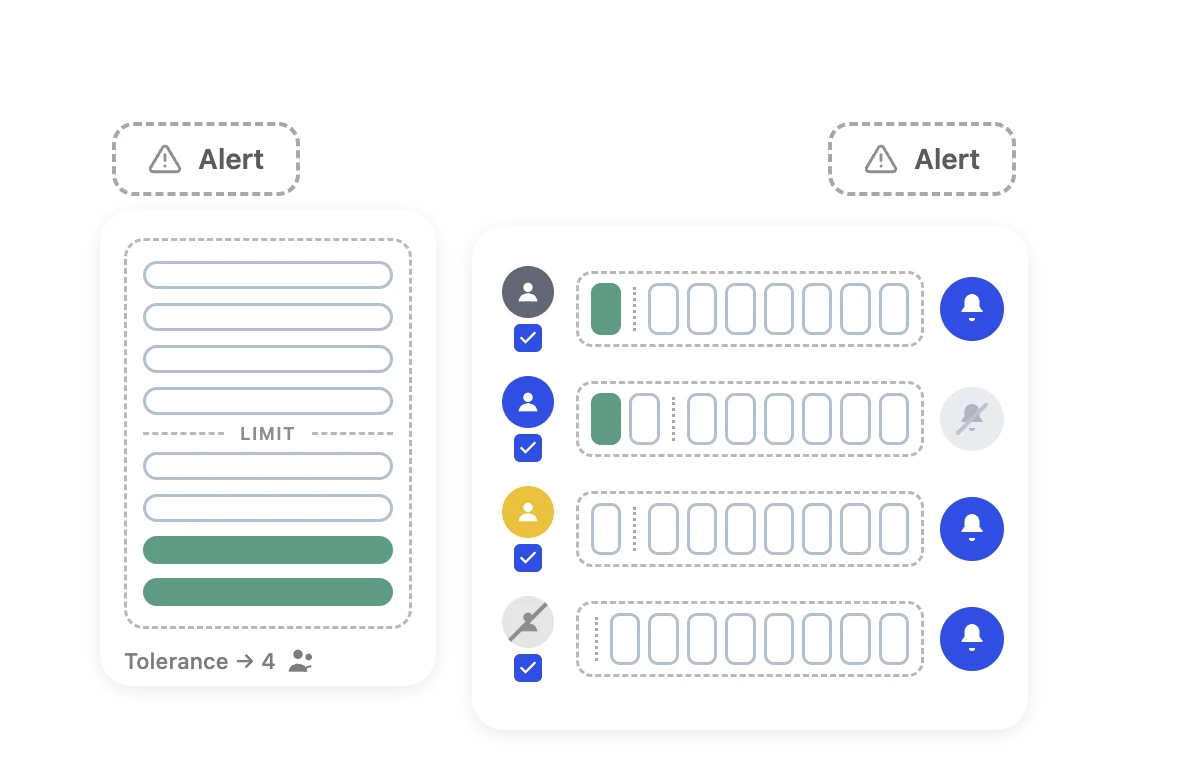 The SecureSafety live occupancy and PPE compliance widget. Aggregated data from this UI can be exported as JSON or CSV for integration with safety dashboards and EHS reporting systems.
CSV export is the simplest option: a tabular file importable into Excel or any business intelligence tool. Useful for periodic reporting but requires a manual or scheduled export step. Appropriate for organisations where safety reporting is a weekly or monthly process rather than a live dashboard requirement.
The SecureSafety live occupancy and PPE compliance widget. Aggregated data from this UI can be exported as JSON or CSV for integration with safety dashboards and EHS reporting systems.
CSV export is the simplest option: a tabular file importable into Excel or any business intelligence tool. Useful for periodic reporting but requires a manual or scheduled export step. Appropriate for organisations where safety reporting is a weekly or monthly process rather than a live dashboard requirement.
JSON via REST API is the most flexible option, allowing your BI or dashboard tool to query event data on demand with filters for date range, event type, zone, and camera. This is the preferred format for integration with platforms such as Power BI, Tableau, or custom-built safety dashboards. It requires some development work on the receiving end but produces a genuinely real-time safety performance view.
Webhook push has the AI platform sending event data to a specified endpoint in real time as events occur. Useful for feeding a live safety dashboard or triggering automated actions in a workflow automation platform — for example, creating a task in a maintenance system when a specific type of equipment-related event fires.
NCSC's Operational Technology Security guidance — published in the NCSC's Guidance on Cyber Security for Industrial Control Systems — emphasises the importance of controlling what data flows out of OT environments, particularly to cloud services. A REST API or webhook sending event metadata (event type, timestamp, location, confidence score) to an analytics platform is a low-risk data flow. An integration sending video clips or streams to a cloud platform is a categorically different risk profile, and one that is typically inconsistent with the on-premise architecture that serious industrial safety deployments require.
What NOT to Integrate
The question that comes up most often from IT teams — and the one to answer clearly — is whether the AI video data can be centralised in a cloud platform.
On-premise safety AI is specifically architected to ensure that no video footage leaves the site. Analysis happens at the edge — on the server physically located at the customer site — and only event metadata travels across the network. This is not a technical limitation; it is a deliberate design choice that addresses three real problems:
Data protection obligations. Video footage containing identifiable individuals is personal data under UK GDPR. The ICO's guidance on surveillance camera systems makes clear that deploying CCTV-based monitoring requires a lawful basis, a legitimate purpose, and — where footage is shared with third parties including cloud platforms — a data processing agreement with that third party. For most industrial sites, the simpler and more defensible answer is not to send it off-site at all.
OT network security. The camera network is part of the operational technology environment. Unrestricted outbound data flow from the OT network to cloud services is inconsistent with NCSC OT security guidance and with most industrial network security policies. Each outbound data flow from an OT-adjacent device is an attack surface that requires assessment and governance.
Bandwidth and reliability. A continuous video stream from a forty-camera deployment across a standard enterprise WAN connection is not a realistic proposition. On-premise processing eliminates this constraint entirely — the heavy computational work happens at the edge, and only lightweight event data travels across the network.
The integration architecture that works is: event data flows out to wherever it needs to go; video stays on the on-premise recording infrastructure. That is not a compromise — it is the correct architecture.
Six-Layer Integration Readiness Checklist
Confirm readiness across all six layers before beginning a safety AI deployment:
Layer 1 — Camera network access
- Camera subnet is accessible from the proposed AI server location
- RTSP credentials are available for all cameras in scope
- Camera firmware is current and ONVIF compatibility confirmed where required
- Network bandwidth from cameras to AI server confirmed (minimum 2–4 Mbps per camera at 1080p)
Layer 2 — Alert delivery
- Control room display integration method confirmed (HDMI direct, IP display, VMS widget integration)
- Mobile device alert platform identified (MDM-managed push notification, or third-party alert app)
- PA and radio integration assessed — physical relay required? Who installs and tests?
- Access control integration assessed — relay output compatible with existing access control panel?
Layer 3 — EHS and incident management
- EHS software export format confirmed (REST API, CSV scheduled export, or manual pull)
- Decision made on direct EHS integration versus event log access on demand
- Alert severity tiers defined: which events auto-create EHS records, which remain in the AI event log only
- Data retention requirements confirmed and aligned with AI platform settings
Layer 4 — Analytics and reporting
- BI tool or dashboard platform identified
- Export format confirmed (JSON REST API, CSV, webhook)
- KPI definitions agreed: compliance rate calculation method, alert response time measurement, trend period
Layer 5 — Network security
- OT/IT network segmentation reviewed with IT security team before deployment
- Outbound data flows from AI server documented, reviewed, and firewall-approved
- Vendor remote access method defined (MFA-authenticated VPN, jump host, or on-site only)
Layer 6 — Data protection
- DPIA (Data Protection Impact Assessment) completed or documented as not required, in line with ICO guidance
- Workforce information notice issued confirming AI monitoring is in use
- Data retention policy set, documented, and reflected in platform configuration